Note that iptables and ip6tables should be used always together!
Tables
Iptables manages a set of tables which act as ACL Access Control Lists.
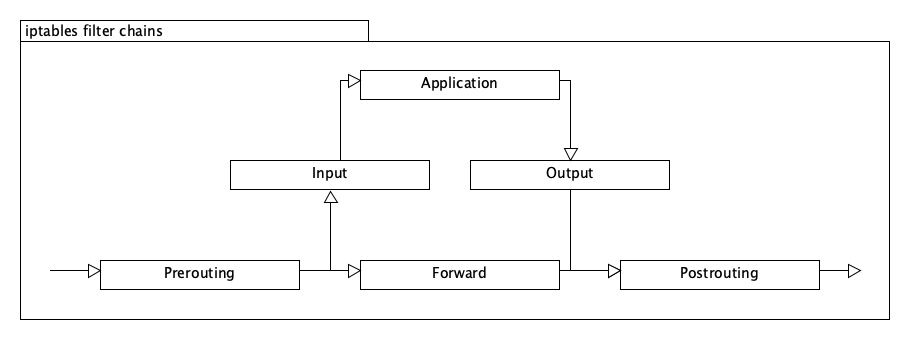
- filter: default table
- INPUT handles all packets for this system.
- OUTPUT handles all packets from this system.
- FORWARD handles all packets which are not from nor for this system.
- nat: table for network translation
- PREROUTING modifies packets when they arrive.
- POSTROUTING modifies packets before they leaving.
- OUTPUT modifies packets which are from this system.
- mangle: table for manipulating packets
- raw: high-priority table for superset other rules
- security: additional table for tools like SELinux.
Actions
Actions are defined via the -j option.
- ACCEPT allows a packet
- REJECT rejects a packet
- DROP ignors a packet
- LOG logs a packet
- SNAT modifies the source address (only in the nat table)
- DNAT modifies the destination address (only in the nat table)
- MASQUERADE modifies a packet (only in the nat table)
Examples
Show all rules
iptables -L
ip6tables -L
Ignore all packets from a network:
iptables -A INPUT -s 192.168.5.1/32 -j DROP
ip6tables -A INPUT -s fd75:943b:5f2e:0:a4:45a1:b753:4152 -j DROP
Allow a specific port from everywhere:
iptables -A INPUT -p tcp --dport 80 --destination $LOCALIP -j ACCEPT
ip6tables -A INPUT -p tcp --dport 80 --destination $LOCALIP6 -j ACCEPT
Allow only packets which belong to an existing connection:
iptables -A INPUT --destination $LOCALIP -m state --state ESTABLISHED,RELATED -j ACCEPT
ip6tables -A INPUT --destination $LOCALIP6 -m state --state ESTABLISHED,RELATED -j ACCEPT
Persist netfilter rules
Via init script:
vi /etc/systemd/system/iptables.service
---
[Unit]
After=network.target

[Service]
Type=simple
RemainAfterExit=yes
ExecStart=/etc/init.d/iptables start
ExecStop=/etc/init.d/iptables stop
ExecReload=/etc/init.d/iptables restart

[Install]
WantedBy=multi-user.target
---
systemctl enable iptables
Or via systemd / networkd:
auto eth0
iface eth0 inet static
    ...
    up /etc/init.d/iptables
Measure traffic from/to a location
iptables -I INPUT 1 -s 10.10.10.10 -j ACCEPT
iptables -I OUTPUT 1 -d 10.10.10.10 -j ACCEPT
iptables -Z
Now perform the actions. Then
iptables -nv -L
Leave a Reply
You must be logged in to post a comment.